
Supply chain and third parties
Your IT Provider's Control Panel Is the Shared Front Door
In one week, attackers went through two tools that IT providers use to run their customers' computers. A patched server was not safe, and a forgotten add-on skipped the login. Here is what to ask your provider, and what to put in the contract.
In one week, attackers went through two tools that IT providers use to run their customers' computers. A patched server was not safe, and a forgotten add-on skipped the login. Here is what to ask your provider, and what to put in the contract.
Facts as of 20 Nov 2026.
At 17:47 UTC on 11 November, commands started arriving on computers that belonged to dozens of different organisations. They came through a familiar door: the remote support consoles their IT providers used every day. They ran with full system rights.
In 90 minutes they had installed a second, attacker-controlled copy of the remote support software on at least 288 computers in 48 organisations that Huntress protects, a third of them in the first ten minutes [9]. Nobody logged in to do it. There was no login activity to find [9].
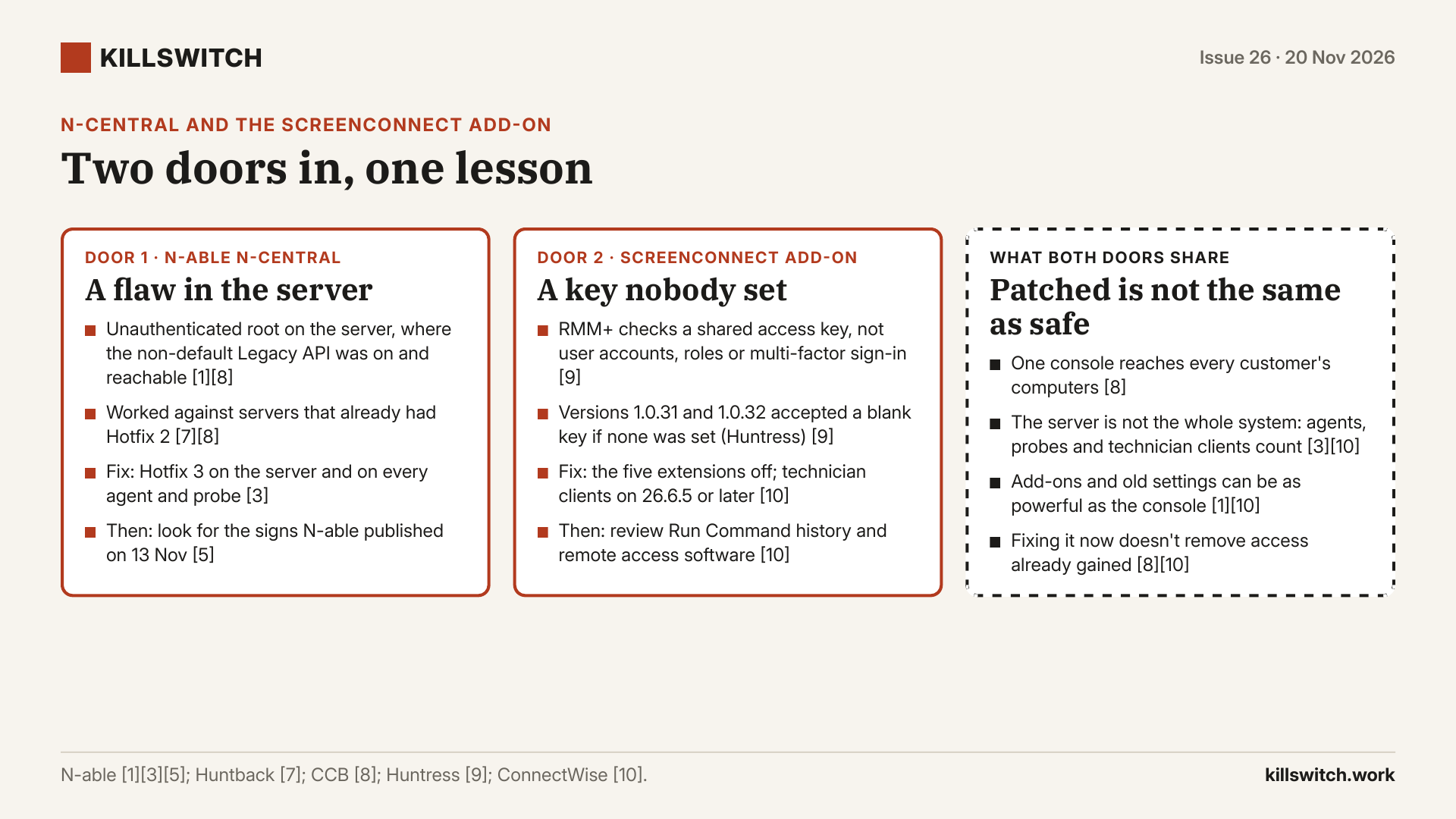
That was ScreenConnect, a remote support tool made by ConnectWise. Two days earlier, a researcher had published working attacks on N-able N-central, another tool IT providers use to run their customers' computers [6][8]. Two different tools, two different flaws, one week.
What they have in common is the point of this issue: when you hire an IT provider, its control panel becomes a front door to your company, and you share that door with all of its other customers.
This issue is for one reader in particular: the IT lead or founder of a company of around 60 people whose computers are looked after by an outside IT provider, a managed service provider in the trade's language. It is also for the compliance lead who keeps that provider's file. You don't run these tools. You can't patch them. But you can ask the right questions this week, and you can make sure the next contract answers them for you.
Two tools, one week
N-able N-central is a remote monitoring and management tool: one server, run by the IT provider or hosted by N-able, with a small agent program on every computer it looks after. On 9 November an independent researcher published details of 33 vulnerabilities in it, with working exploit code, under the name "Able2Shell" [6][8].
N-able took its own hosted servers offline the same day and recommended that customers do the same [1]. On 10 November it released Hotfix 2 (build 2026.4.1.26) and brought the hosted servers back [1][2].
That should have been the end of it. It wasn't. In the early hours of 12 November (UTC) the same researcher published two more attack chains, "4EverAble2Shell" and "Agent2Shell", tested against Hotfix 2 [7][8].
The first gives an attacker with no password full control (root) of the N-central server, but only where an older interface, the Legacy API, has been switched on and can be reached [1][6][8]. N-able says that setting is off by default and not recommended [1]. Huntback's findings, repeated by Belgium's cyber agency, show some servers had it on anyway [7][8].
The research company Huntback watched what happened next. The exploit code went public at 03:58 UTC. By 09:16 UTC someone was running the full chain against its decoy servers. At 12:50 UTC a cryptocurrency mining account tied to the attacker listed 21 live N-central servers, and 19 of them were running Hotfix 2 [7].
The Centre for Cybersecurity Belgium, the national cyber agency, repeated that finding in its own warning and said it "supersedes the earlier statement that no attacks had been observed" [8]. On 13 November N-able published signs to look for, for customers who had not switched the Legacy API off, including the download of a crypto-mining program [5].
On 16 November N-able released Hotfix 3 (build 2026.4.1.39). It removes the Legacy API for good and fixes 17 more flaws [1][3]. It also comes with a warning that matters for you: every agent and probe on customers' networks has to be upgraded too. In N-able's words, "Agents and Probes that are not upgraded are susceptible to impersonation" [3].
ScreenConnect is a remote support tool: the technician clicks, and they are on your screen. Like many such tools, it accepts add-ons, small extensions written by other companies. One of them, RMM+, lets another tool send commands through ScreenConnect without a technician at the console [9].
Huntress, the security company that investigated, found that RMM+ checks requests against a shared access key, not against ScreenConnect's user accounts, roles and multi-factor sign-in. In versions 1.0.31 and 1.0.32, if nobody had ever set that key, a blank one was accepted [9]. Huntress says most of the installations it found were legitimate, "usually added for a project and left in place" [9].
ConnectWise disabled RMM+ and four other third-party extensions in about 400 partner environments where it could, and told partners who run ScreenConnect on their own servers to switch them off themselves [10]. On 13 November Huntress saw a second wave: 205 more computers in 41 organisations [9]. Those counts are only the companies that use Huntress, so the real total is probably higher.
In one case, a single ScreenConnect panel reached 190 computers [9]. On 12 November ConnectWise said it had found no evidence that the first access involved a flaw in ScreenConnect itself. On 16 November it said its investigation was complete, and that researchers were still reporting attacks on self-hosted setups where the extensions remained on [10].
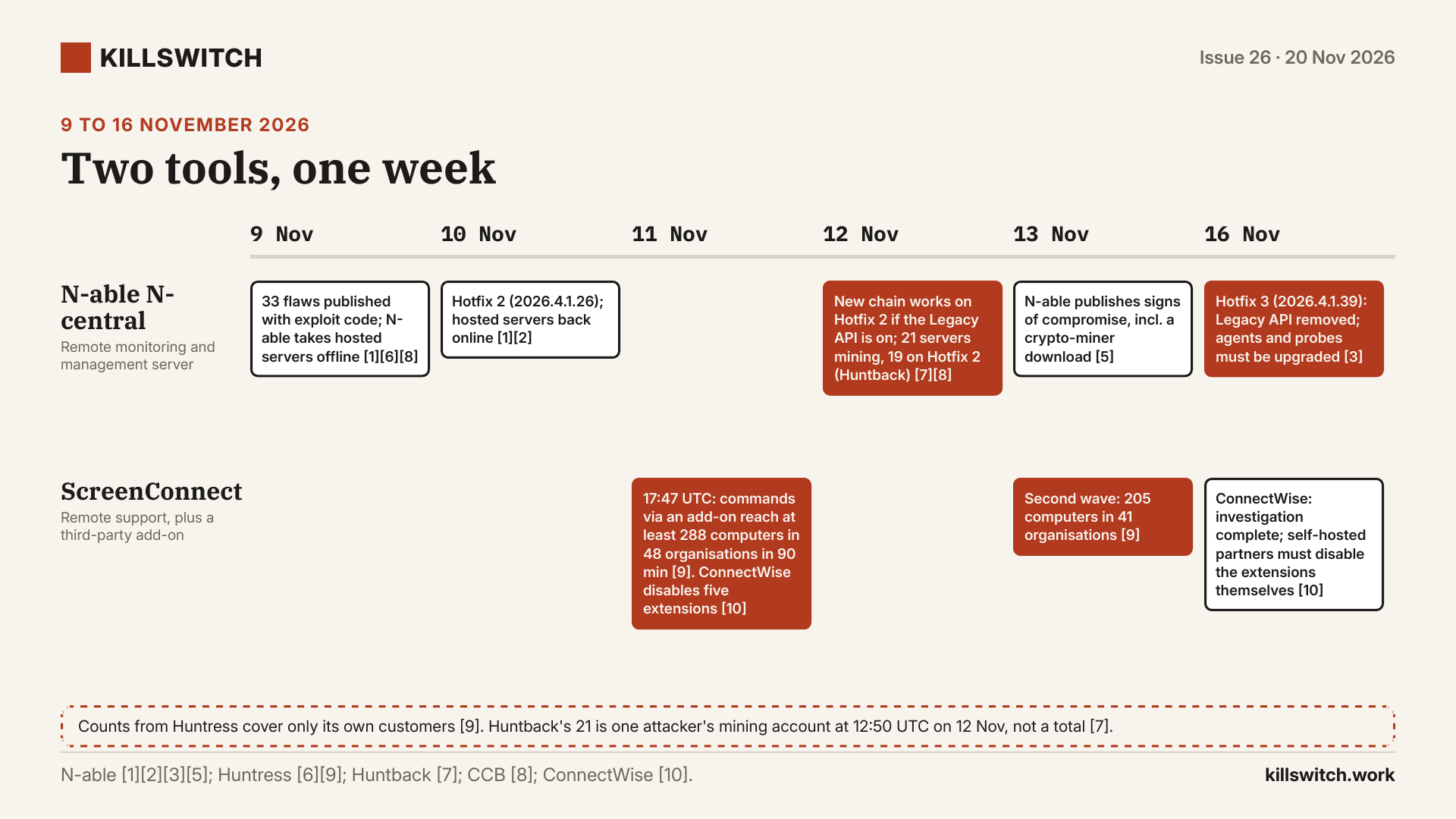
Why one console is a shared front door
Belgium's cyber agency put it in one line: "Whoever takes over the N-central server controls every device it manages, including clients' networks" [8]. The same is true of any remote support or management console. It is built to reach every computer, as the most powerful user, without asking anyone. That is the service you pay for. It is also why attackers like it so much.
None of this means your provider did something wrong. Both tools are widely used, both vendors shipped fixes within days, and most providers will have patched quickly. But your security now depends on decisions you never see: which version runs, which settings are on, which add-ons were installed for a project three years ago. You can't see them. You can ask about them.
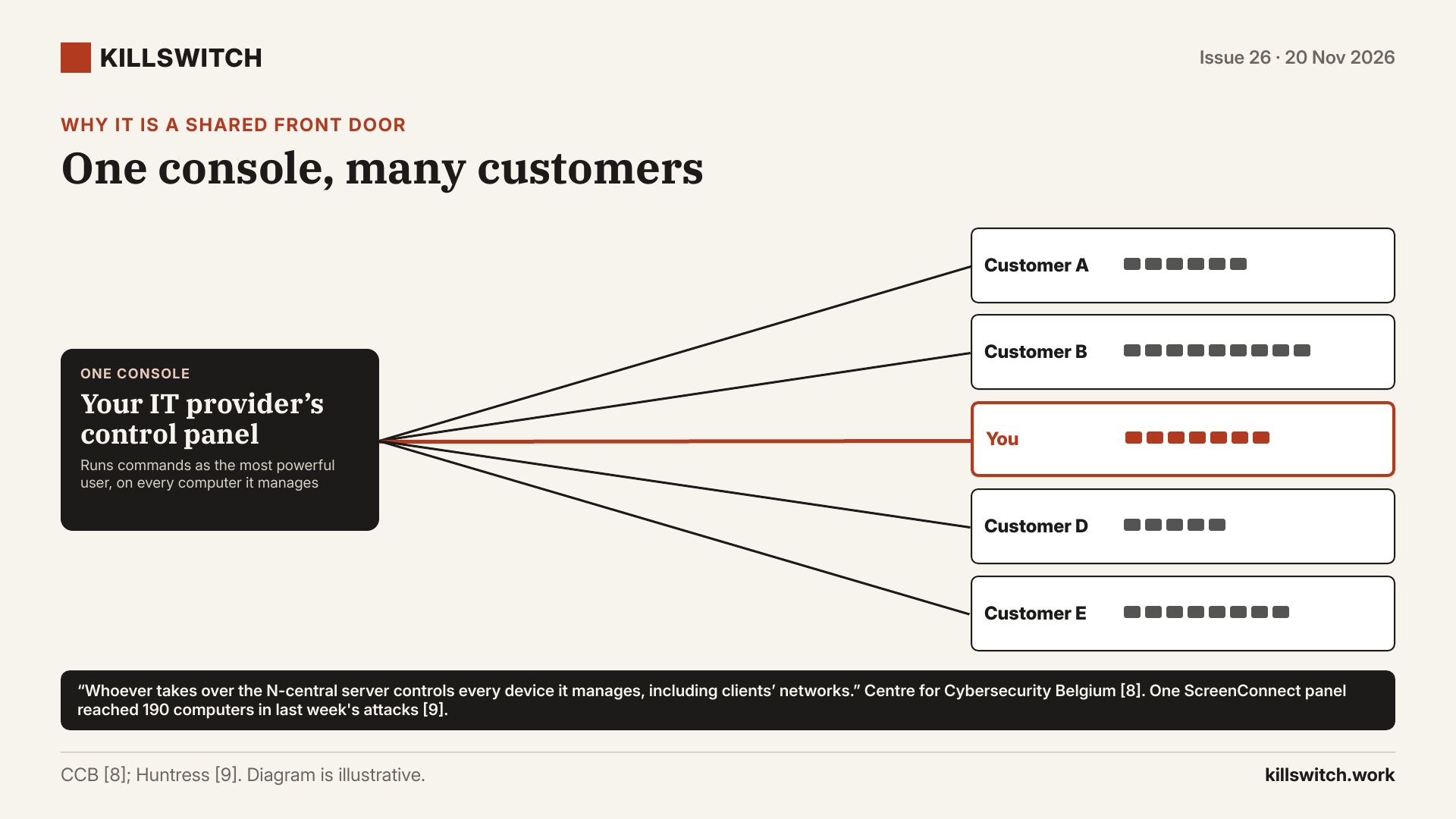
Patched was not the same as safe
The most useful lesson in this story is not about either vendor. It is about the word "patched".
- A server can be patched and still open. 19 of the 21 mining servers Huntback found had the first fix installed [7]. The setting that mattered, the Legacy API, was not part of that fix.
- The server is not the whole system. N-able says every agent and probe must be upgraded too [2][3]. ConnectWise says that "Updating the server alone does not confirm that technician clients are updated" [10].
- Add-ons count. The ScreenConnect attacks went through a third-party extension, not through ScreenConnect itself [10][11]. An add-on that can run commands is as powerful as the console.
- Fixing it now doesn't undo last week. ConnectWise says disabling extensions and updating software "do not remove unauthorized access or persistence already established" [10]. Belgium's agency says the same of patching [8]. Someone has to look.
Ten questions to ask your IT provider this week
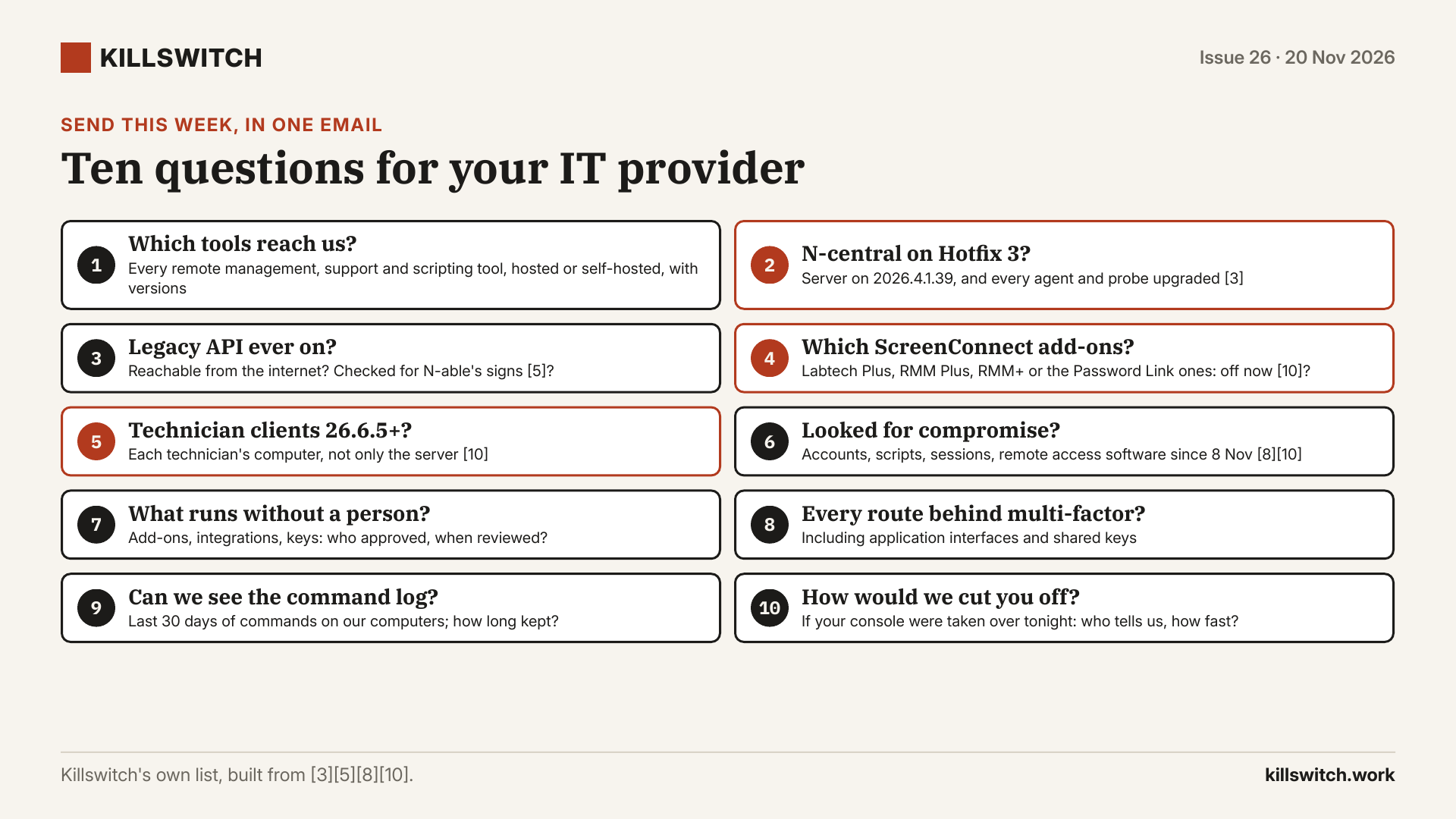
Send these in one email. A good provider will answer them in a day, and won't mind being asked. If they don't use either tool, the first answer saves everyone time, and the rest are still worth asking.
- Which tools can reach our computers? Name every remote management, remote support and scripting tool, whether it is hosted by the vendor or runs on your own server, and its version.
- If you use N-central: is the server on 2026.4 Hotfix 3 (build 2026.4.1.39), and are every agent and probe on our network upgraded too [3]? When was it done?
- Was the N-central Legacy API ever switched on? If yes, was it reachable from the internet, and did you check for the signs N-able published on 13 November [5]?
- If you use ScreenConnect: were Labtech Plus, RMM Plus, RMM+, RMM Plus Password Link or RMM+ Password Link ever installed, and are they disabled now [10]?
- Are all technician clients on ScreenConnect 26.6.5 or later? ConnectWise asks partners to check each technician's computer, not only the server [10].
- Have you looked for signs of compromise since 8 November? Unexpected admin accounts, scripts, remote sessions and remote access software, on your side and on our computers [8][10]. Can we see the result?
- Which add-ons, integrations or keys can send commands to our computers without a person signing in? Who approved each one, and when was it last reviewed?
- Is every route into the console behind multi-factor sign-in? Including application interfaces and shared keys.
- Can you send us the log of every command run on our computers in the last 30 days? How long do you keep it?
- If your console were taken over tonight, how would you tell us, and how fast could we cut it off?
What to put in the contract
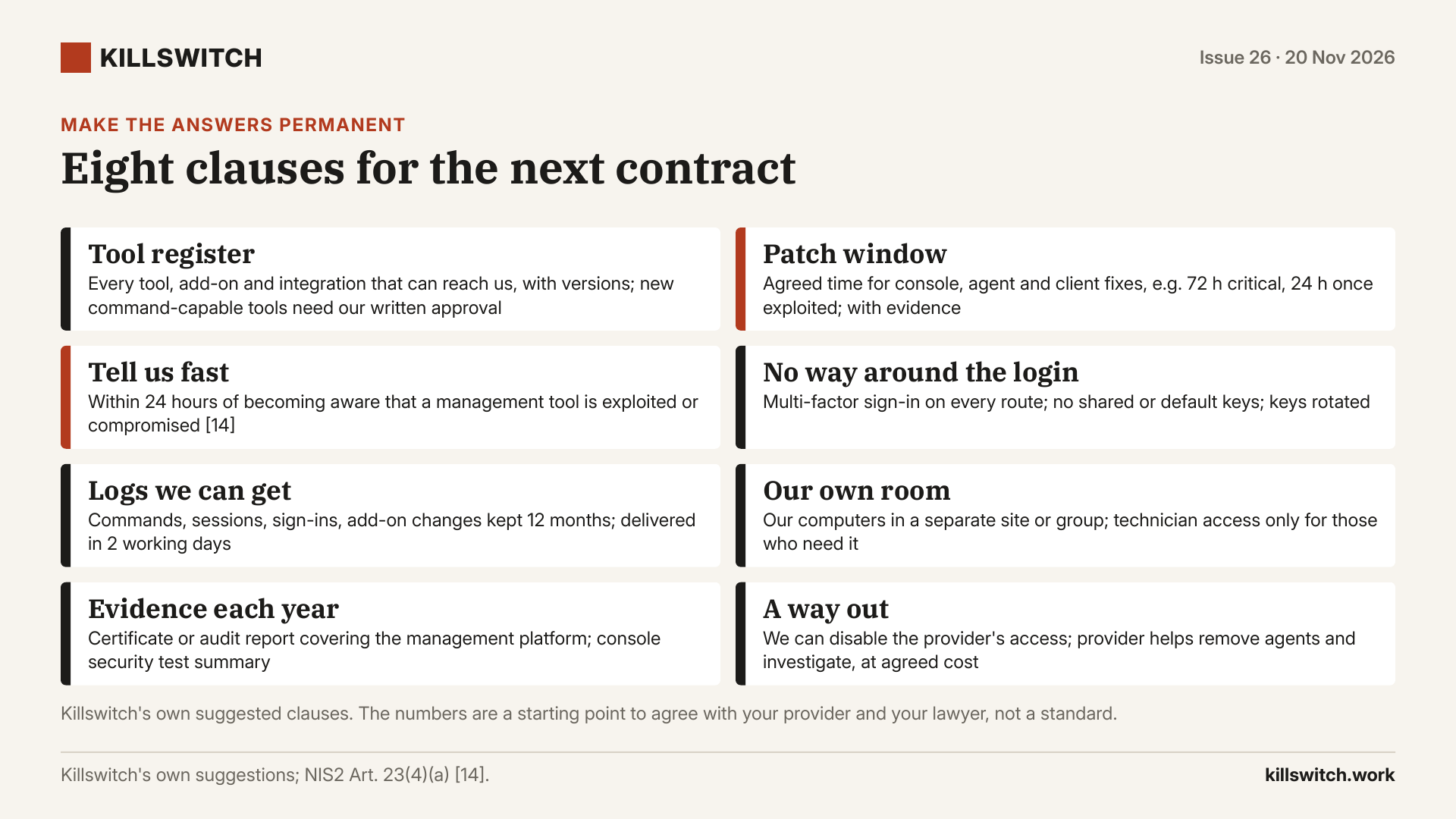
Questions work this week. Contracts work every week after. These are Killswitch's own suggested clauses. Have your lawyer fit them to your agreement, and agree the numbers with your provider; ours are a starting point, not a standard.
- Tool register. The provider keeps a list of every tool, add-on and integration that can reach our systems, with versions, and shares it on request. New tools that can run commands need our written approval first.
- Patch window for the control panel. Security fixes for remote management servers, agents and technician clients go on within an agreed time: for example 72 hours for critical fixes, and within 24 hours once the vendor or CISA's list of exploited flaws says attackers are using it. The provider confirms with evidence.
- Tell us fast. If a tool used to manage our systems is hit by an exploited flaw or a compromise, the provider tells us within 24 hours of becoming aware. That gives us time for our own 24-hour early warning if we fall under NIS2 [14].
- No way around the login. Multi-factor sign-in on every route into the console. No shared or default keys. Keys rotated on a schedule and when staff leave.
- Logs we can get. Commands, sessions, sign-ins and add-on changes kept for at least 12 months, and handed over within two working days on request.
- Our own room. Our computers sit in a separate site or group in the console, with technician access limited to the people who need it.
- Evidence each year. A current certificate or audit report that covers the remote management platform itself, and a summary of the last test of the console's security.
- A way out. In an incident we can disable the provider's access ourselves, and the provider helps remove its agents and investigate, at an agreed cost.
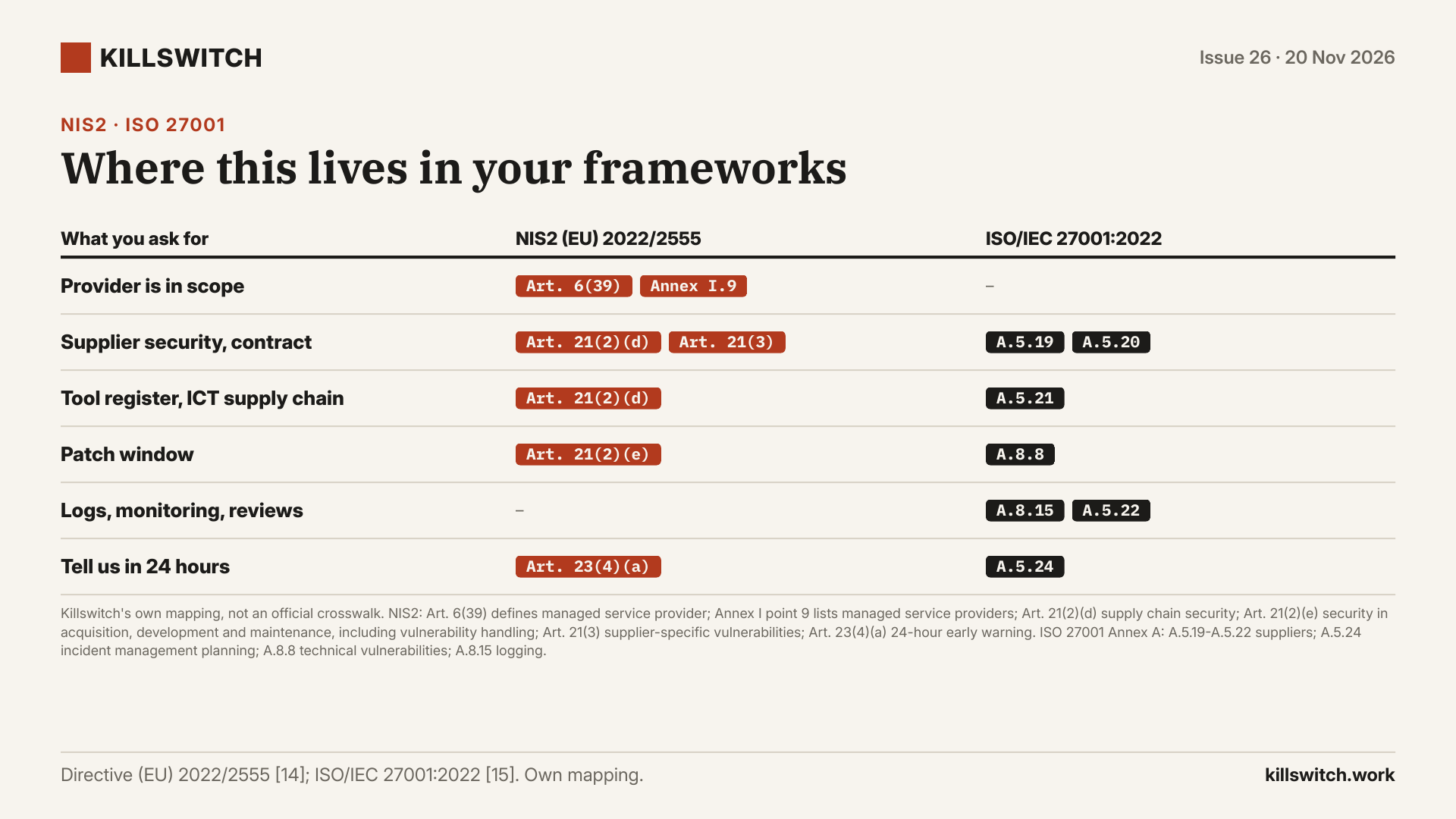
If you are working through NIS2, the European Union's cybersecurity law, this is not extra work. Managed service providers are named in its Annex I [14]. Article 21(2)(d) asks for "supply chain security, including security-related aspects concerning the relationships between each entity and its direct suppliers or service providers", and Article 21(3) asks you to take into account "the vulnerabilities specific to each direct supplier and service provider" [14].
In ISO/IEC 27001:2022 terms, these clauses live in controls A.5.19 to A.5.22 on suppliers, with A.8.8 for vulnerabilities and A.8.15 for logging [15]. The auditor calls it supplier management. The attacker calls it a way in. Same job.
What we don't know yet
- How many servers and computers were hit in total. Huntback's 21 is one attacker's mining account at one moment on 12 November, not a full count [7]. Huntress's numbers cover only its own customers [9].
- Whether N-able's hosted servers were affected. N-able said on 11 November it had seen "no indications of compromise within N-central hosted servers" [4]. Huntress said on 13 November it had not seen exploitation in its partners' environments [6].
- How serious the 17 flaws fixed in Hotfix 3 are. N-able lists them. They had no severity scores when Huntress wrote about them on 16 November. By 20 November all 17 had public CVE records dated 17 November with CVSS 4.0 scores: 3 critical (9.2 to 9.3), 8 high (7.1 to 8.7) and 6 medium (5.3 to 6.9) [3][6][16].
- One detail of the add-on flaw. Huntress describes a blank key accepted in versions 1.0.31 and 1.0.32 [9]. The official CVE record describes a static default secret in all versions, which an administrator can change [11]. Either way, the advice is the same: keep it off.
- Who is behind it. None of the sources name the attackers.
What matters this week, what can wait
Our test is simple. Something matters if attackers are already using it (it is on CISA's Known Exploited Vulnerabilities list, KEV for short: the US government's list of flaws seen exploited in real attacks, kept by the Cybersecurity and Infrastructure Security Agency), if a legal deadline that applies to you lands within about 30 days, or if it changes what an auditor will ask you now.
KEV catalogue version 2026.11.18, checked 20 November: five entries have been added since 13 November, none from N-able or ConnectWise [12]. Due dates are CISA's deadlines for US federal civilian agencies, a useful clock for everyone else.
Matters this week
- ScreenConnect technician clients older than 26.6.5. CVE-2026-84869 (a CVE is the public ID number for a known flaw) lets files be transferred and run during a remote session without the host's say-so [13]. It has been on KEV since 11 September, due 14 September [12]. ConnectWise says version 26.6.5 blocks the spreading trick in last week's attack toolkit, and that updating the server doesn't update technicians' computers [10]. Ask your provider to confirm every technician client.
- N-central Hotfix 3 and the ScreenConnect add-ons, an exception we want to be open about. Neither is on KEV yet, as of 20 November [12], so by our usual rule they would sit under "watch". We are putting them here anyway: Belgium's national cyber agency reports exploitation of servers that already had the first fix [8], and ConnectWise says researchers are still reporting attacks where the extensions are still on [10]. If your provider runs either tool, Hotfix 3 on the server and every agent and probe [3], and the five extensions off [10], are this week's job.
- Also on KEV. Already past due: Check Point CVE-2026-123039 and UnrealIRCd CVE-2026-114713 (due 16 November) and Apple CVE-2024-27834 (due 18 November). SonicWall SonicOS SSLVPN CVE-2026-19868 is due today, 20 November. Added since 13 November: Puppet Enterprise CVE-2026-115731 (added 17 November, due 1 December); on 18 November Synology DSM CVE-2024-10441, REDCap CVE-2026-90817 and Apache Axis CVE-2026-90436 (all due 21 November) and LiteLLM CVE-2026-40217 (due 2 December). Still open from 10 November: Microsoft Outlook CVE-2026-124194, Chromium CVE-2026-125350, Cisco BroadWorks CVE-2026-20320 and Openwave Webtop CVE-2026-111793 (due 24 November) [12]. If you run any of them, patch first and read later.
Can wait
- Severity scores for the 17 Hotfix 3 flaws. They are now published [16], mostly high or critical. Don't wait for the scores to install the fix.
- The argument about disclosure. N-able says the researcher did not report the flaws through its channels [4][5]. It is a fair debate, and not your job this week.
- Changing provider or tool. Both vendors shipped fixes within days [3][10]. Whether your provider is still the right one is a question for the contract review, with the clauses above in hand.
- N-central remote control and the Intune integration. N-able has switched them off for now and says its next release will bring them back; Take Control still works [1]. Wait for that release.
Keep going
Get sharp issues on security, AI security and GRC every working day, Monday to Friday, written for CISOs, vCISOs and GRC leads.
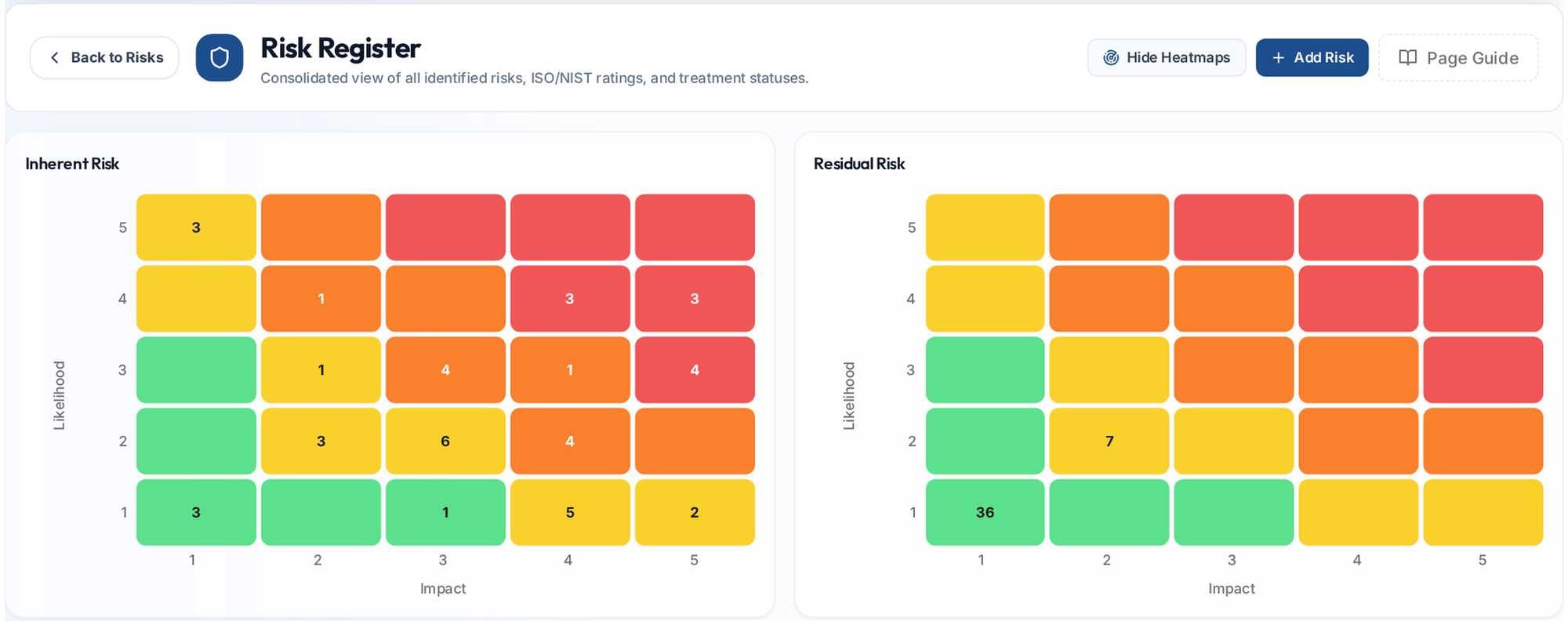
GRCompliance: log the risk your IT provider's console creates in the risk register, attach their answers and the contract as evidence, and map the controls to ISO 27001 and NIS2 in one place.
GRCompliance Core, the open-source edition. Your data stays on your infrastructure.
Ready-to-run training and audit kits for security and GRC teams.
Sources
- N-able: N-able Vulnerability Remediation Update (original post 13 Nov 2026, updated 16 Nov 2026, 5 pm EST)
- N-able Status: N-central 2026.4 HF2 Release Notes, build 2026.4.1.26 (10 Nov 2026)
- N-able Status: N-central 2026.4 HF3 Release Notes, build 2026.4.1.39 (16 Nov 2026)
- N-able: Update on N-central 2026.4 HF2 and ongoing security response (11 Nov 2026)
- N-able: New Security Update on N-central, with indicators of compromise (13 Nov 2026)
- Huntress: N-able Disables Cloud Services Following Disclosure of "Able2Shell" Exploit Chains (updated 16 Nov 2026)
- Huntback: 4EverAble2Shell is already mining Monero on live N-central servers (12 Nov 2026)
- Centre for Cybersecurity Belgium: Warning: N-able zero-day vulnerabilities can lead to full compromise! (10 Nov 2026, updated 13 Nov 2026)
- Huntress: SCKit Worm Installs Rogue ScreenConnect Clients and Session Cookie Relays Across Hundreds of Endpoints (11 Nov 2026, updated 13 Nov 2026)
- ConnectWise Trust Center: ScreenConnect security advisory, precautionary extension disabling and partner guidance (updated 16 Nov 2026, 20:00 UTC)
- CVE record CVE-2026-127063: third-party RMM+ extension for ConnectWise ScreenConnect (published 12 Nov 2026, CNA ConnectWise)
- CISA Known Exploited Vulnerabilities catalog, JSON feed (catalogVersion 2026.11.18, fetched 20 Nov 2026)
- CVE record CVE-2026-84869: ScreenConnect Client guest-to-host file execution (published 8 Sep 2026, CNA ConnectWise)
- Directive (EU) 2022/2555 (NIS2): Article 6(39), Article 21(2)(d) and 21(3), Article 23(4)(a), Annex I point 9. EUR-Lex
- ISO/IEC 27001:2022 Information security management systems
- CVE records CVE-2026-129271 to CVE-2026-129287: the 17 N-central flaws fixed in Hotfix 3 (published 17 Nov 2026, CNA N-able; CVSS 4.0 scores, read 20 Nov 2026)
Facts as of 20 Nov 2026. Facts and quotations are from N-able's advisories and release notes, ConnectWise's Trust Center advisory, the CVE records, CISA's KEV feed, the Centre for Cybersecurity Belgium's warning, Huntress's and Huntback's published research, and Directive (EU) 2022/2555 (NIS2) as published on EUR-Lex. The questions, contract clauses and framework mapping are Killswitch's own suggestions.
Emmanuel Aigbehi Walstra is a CISO who also serves as a virtual CISO (vCISO) for several organisations, with 30+ years in cybersecurity, 10,000+ people trained, and author of the CCSP Excellence books.
Checked against the primary sources cited above. Spotted an error? See our corrections page.